
Slack Notification Overload Is Not a Workflow

You know the sound.
Ding.
Someone posted an update. Or a question. Or a reaction to a reaction. Or a GIF that is technically work-adjacent.
By the time you've caught up on the thread, you've lost the thing you were actually doing, and there are four more unread messages in two other channels.
This is the reality of Slack notification overload for most modern teams, and it has nothing to do with how hard people are working. It has everything to do with asking one tool to do a job it was never designed for.
Slack Is a Communication Tool. Not a Command Center.
Let's be clear about something: Slack is genuinely excellent. Fast, flexible, and built for the kind of quick back-and-forth that used to require email chains that went nowhere.
The problem is not Slack. The problem is what teams have turned it into.
When Slack workflow organization breaks down, the channel becomes the default home for everything: status updates, project decisions, accountability check-ins, blocker flags, approval requests, and follow-ups on all of the above. It feels like it's working because messages are moving. But when you look at what's actually getting done, the picture gets murkier.
Slack productivity problems tend to follow a pretty predictable pattern. Important updates get buried under casual conversation. Decisions made on Tuesday become archaeology projects by Friday. The people who post most frequently get the most visibility, regardless of whether they're moving the most critical work forward.
Activity and progress are not the same thing. A busy channel is not the same as an organized team.
The Hidden Cost of Workplace Notification Fatigue
Remote team messaging overload is not just annoying. It is expensive.
Every notification pulls someone's attention away from focused work. And attention does not snap back instantly. Research on cognitive interruption consistently shows that recovering from a distraction takes far longer than the interruption itself. Multiply that by a full day of pings, tags, and thread replies, and the productivity loss becomes significant.
Workplace notification fatigue shows up in subtle ways before it becomes obvious. People start triaging by volume instead of priority. They respond to the loudest channel instead of the most important task. They develop the habit of checking messages before checking their actual goals for the day.
And because everyone is reacting at the same pace, the whole team moves faster while somehow making slower progress on the things that matter.
Managing Slack distractions is not just a personal productivity tip. It is a team design problem, and it requires a structural solution.
Project Visibility Needs More Than a Chat Thread
Here is the most common symptom of Slack vs project management tools confusion: the update that exists somewhere in a channel but that nobody can find when they need it.
"Didn't someone post the status on that last week?"
"Was that before or after the server thread?"
When your documentation strategy depends on someone's memory and a search bar, the documentation strategy is broken. Project visibility tools exist precisely because chat threads were never built to hold structured information over time. They move too fast. The important gets buried under the immediate.
This is why async team communication needs a dedicated layer separate from conversation. Not instead of Slack, but alongside it, handling the structured daily accountability that chat was never designed to support.
For a deeper look at what async communication actually means for team performance, our post on Asynchronous Standups: What They Are and Why They Matter is a good place to start.
What Standup Bot Communication Actually Solves
Standup bot communication fills the gap between "we talked about it in Slack" and "we have a clear, organized record of where everything stands."
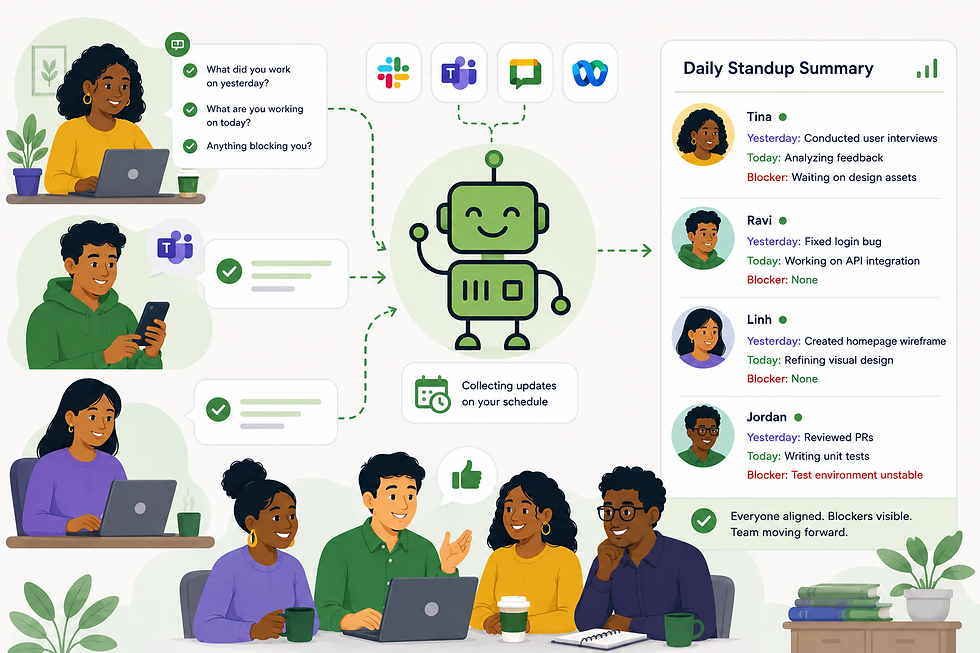
Here is how Standup Alice handles it. Every day, Alice sends each team member a prompt directly inside Slack, Microsoft Teams, Google Chat, or Cisco Webex. They answer on their own schedule. Alice compiles every response into a structured summary report and posts it to the team channel automatically.
No chasing people for updates. No tagging someone who missed the thread. No ten-minute search through channel history to find out whether a blocker was resolved.
The result is a team channel that actually stays useful, because conversation and status updates are no longer competing for the same space. Slack handles the quick, informal back-and-forth it was built for. Alice handles the daily visibility and accountability layer that keeps projects moving.
If you want to see what that summary report looks like in practice, our post on How Standup Summary Reports Give Your Team Better Visibility walks through a real example.
How Async Team Communication Reduces Notification Load
One of the first things teams notice after setting up async standup check-ins is that the channel gets quieter. And paradoxically, people feel more informed.
That is not a coincidence. A significant portion of the noise in most Slack channels is people chasing information they do not have: status pings, follow-up questions, clarification threads for decisions that were made but never properly documented. When Alice handles the daily check-in and posts a clean summary automatically, that noise has nowhere to go because the information people were hunting for is already there.
What remains in Slack is actual conversation: fast, informal, collaborative, and suited to the tool.
For teams weighing whether to keep a live standup or make the switch to async, our post on Async vs. Live Standups: Which One Actually Works? covers the tradeoffs without overselling either side.
Remote Team Messaging Overload Is a Design Problem, Not a People Problem
It is tempting to frame remote team messaging overload as a discipline issue. People just need to check Slack less often. Mute some channels. Set better boundaries.
That framing puts the burden on individuals to work around a structural problem. And it rarely sticks.
When a team's workflow runs through a single chat tool, every team member has to stay plugged in to avoid missing something important. The notifications are not the bad habit.
They are the logical response to a system that requires constant monitoring to function.
The fix is not quieter notifications. It is a workflow design where critical information does not live exclusively in a chat channel.
Standup Alice gives remote teams a structured daily communication layer that reduces the need to monitor Slack constantly, because the updates that matter are collected, organized, and delivered automatically. No one has to stay glued to the channel to stay informed.
Slack Workflow Organization Starts With Knowing What Slack Is For
The teams that use Slack most effectively are the ones that made a deliberate decision about what it is and is not for.
Slack is for conversation: quick questions, informal collaboration, team culture, real-time problem solving when it actually needs to be real-time. It is not for project visibility, ownership tracking, blocker documentation, or daily accountability.
When those functions move to a dedicated async standup tool, slack workflow organization becomes significantly easier because the channel is doing one job instead of five.
The daily update your team needs is not a conversation. It is a structured record. Treat it like one, and both the standup and the Slack channel get better at the same time.
Because "I'm pretty sure someone mentioned it in #general" was never going to scale. And your team's visibility deserves better than a search query and a guess.
Ready to see what your standups look like without the meeting?
Standup Alice prompts your team daily, collects their updates, and delivers a clean summary straight to your team channel. Works in Slack & Microsoft Teams.


Comments